

NEON2 NCCNEON2 NCC

RUSSIAN

About

SEO Service

IP-nodes

Projects

Armageddon

IRC-NeonNet

IRC galleries

Contacts

Search the Net:


uaportal.com

Фидо в Абакане, Хакасия 2:5007/11 - Fido on line, софт. JRoshin

Valid HTML 4.01!


ABOUT

Welcome to the NEON2 NCC website. This site contains information about connecting to Neon_#2-NeonNet FTN-node, also there are hosted #arena@RusNet IRC galleries.

This server was opened in the middle of year 2000 as Kiev FTN NeonNet network dialup node, then it was joined some other FTN networks, in year 2002 became dialup node in X-Net Kiev FTN network, and in the beginning of year 2003 - FidoNet too. At this time NeonNet (11:463/177), FidoNet (2:463/877) and X-Net (2000:10/177) network services are available.

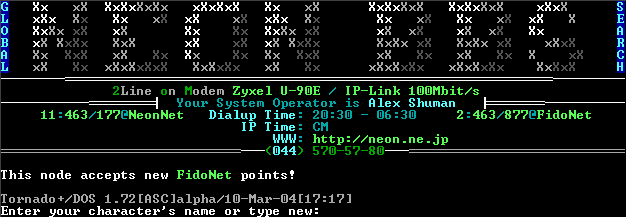
The dialup node operates at Kiev 570-5780 phone, full international phone code is +380-44-5705780. Work time: 20:30-06:30 EEST (UTC+2). BBS services are available too, you can login there using some terminal software (ZOC is recommended).

"NEON2 IP" node neon2.mine.nu works on CM basis, only FTN-services are allowed. (BBS not works due to COM/IP problems). IFC, ITN, IBN protocols are supported.

Here (local) you can download Neon_#2 FTN point software. Unpack that in C:\FIDO\ using 7-Zip archiver (developer's site) or 7-Zip (A) 4.15b (local).

In April 2006, the node connected to N-Line ISP network, so traffic between nodes in that network is free. Internal IP is 10.0.1.138.

Server FAQ:

Warning! If you have ZOC, we strongly recommend you to download ZOC configuration file, and replace your existing STANDARD.ZOC in \Program Files\ZOC\OPTIONS\ (or where your ZOC installed). It will help to solve the majority of all problems covered by this FAQ. Also, if you have ZOC 5 or higher, and you want to see russian letters properly, set Lucida Console or Terminal IBM/DOS/OEM font in Session Profile->Fonts.

Warning! BBS Internet gate currently down due to COM/IP problems. Only dialup BBS is supported. Also, dialup BBS has some problems while transferring big files.

Q: After connecting to server there is a "Press ESC-ESC" message and disconnect after some time.
A: You must press that ESC key two times quickly. Failed? Try again.

Q: Cannot go past !login: prompt.
A: Please read the system prompt carefully. You are required to use login bbs if you want to use BBS software. If you get Access denied message after typing that login, your terminal is currently not set for ANSI BBS terminal. Check your terminal's settings: turn off CR=>CR/LF or CR/NULL (for UNIX systems) replacement (your terminal must not replace CR with that). Windows users are strongly recommended to use ZOC, and UNIX users must set their terminals to NOT replace CR.

Q: I have Russian charset problems.
A: This server supports only one Russian charset - CP866, but you can use english interface if you cannot read Russian or your terminal not supports it.

Q: I got 'realname' request/errors on BBS login screen.
A: If you were not registered before, you must enter your real name (both first and last name separated with space) as your primary login. Later, in registration process, you can choose your short secondary login (alias) and use this login further.

Q: I have problems while choosing/uploading/downloading files.
A: To choose a file, you must use 'File listing' item in the 'Files' menu. You can upload files into only one BBS filearea - "Recent Uploads", but please read all BBS news (especially, FAQ) before that. You can download files from any location only after 'Ext. registration' (you can choose that in the main BBS menu, if you were not 'Ext. registered' before by answering yes for the last main registration question). Warning! ZModem file transfers are not compatible with standard telnet settings. You must setup your terminal to use 'direct socket connection', if you have ZOC, check in Telnet options 'Pure socket connection (no telnet).

Q: I have troubles connecting FTN-node over IP.
A: Check your IP-mailer configuration. My node has neon2.mine.nu address, and it supports IBN, IFC and ITN protocols. You must have IP-mailer with support for at least one of these protocols. If you have t-mail.nt/ip, you can add to subst.lst the following:

11:463/177 ipaddr neon2.mine.nu flags IFC, ITN

and if you still have troubles while connecting, add to your t-mail.ctl the following:

[I] PingTimeout 0

this should fix your ICMP firewalling problems.


Best viewed at 1024x768.
Designed by Alex Shuman.
© 2003-2008 "NEON2 NCC". All rights reserved.

Changed: 30.11.2007 23:56:02


NEWS

19.05.2008 World bandwidth for NEON2 IP node is now 5 Mbit.

22.04.2008 SEO Service updated.

30.11.2007 You can now register your discount .JP .NE.JP domains through our site.

13.08.2007
NEON2 NCC presents the new SEO services for webmasters.

01.05.2007 Svit Ekranu site is up again, in archive mode.

10.04.2006 Node connected to N-Line 100mbit network.

17.01.2006 IP-node works CM. Main page updated.

05.02.2005 Fresh filelist of Neon_#2 node is now available for download.

02.07.2004 Projects updated with my Tornado BBS version.

18.04.2004 New IRC gallery. English site version.

15.04.2004 Site went back online after half-week server problems.

09.04.2004 FAQ for neon2.mine.nu server users.

05.04.2004 Download Center :)

03.04.2004 Internal site structure changed (HTML=>PHP). New Contacts

16.03.2004 Thanks to ISP FAUST for helping to bring IP-node and telnet-BBS server areas back online.

25.11.2003 Added Armageddon area.

04.09.2003 Added IRC-Arena gallery.

04.08.2003 Added Projects area.

17.07.2003 Added NeonNet IRC channel description.

16.07.2003 Internal design changes.

30.05.2003 First internet version of this site.